Christina Mangiapani, Publications Editor, WSU CAHNRS Communications
Lagene Taylor, Publishing Coordinator, WSU CAHNRS Communications
How to Use this Template
In order to streamline the publishing process, we ask that authors submit manuscripts with minimal formatting. Not only does this reduce the risk of errors transmitted through formatting quirks but it also saves you time and a headache—manuscripts are ultimately designed by our team in a WordPress template and no one particularly likes fiddling with formatting in Word.
Save this document to your desktop (or wherever you keep files for drafting Extension manuscripts). Once you’ve read the instructions, delete the text and begin drafting your manuscript in this document.
Styles
In Word, Styles can be set for uniform formatting with a simple click. To access the Extension publications styles in this template, click on the “expand” icon in the Styles section of the Home tab in this document (Figure 1).
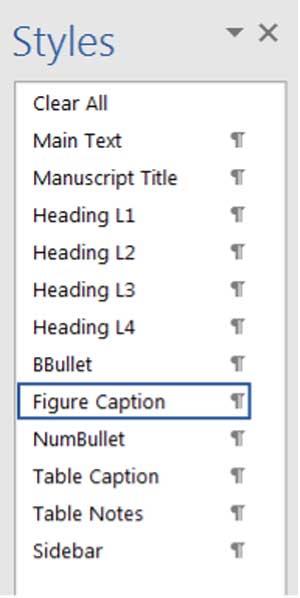

Once you click on the “expand” icon, the Styles tool will display the template styles in a vertical menu on the right of this Word document (Figure 2). It’s from this menu that you’ll apply the template formatting to your manuscript.
To use these styles, simply click on the appropriate style for whichever piece of the manuscript you’re working on and the text will transform to the template style.
You’ll notice there are only 12 styles in the list—this is to encourage simplicity. Ultimately, your manuscript will be designed for web in WordPress. WordPress turns your manuscript into a discrete webpage, making it searchable and multi-platform, or “portable” across devices.
In order to accomplish these priorities, WordPress has limitations. The styles in this template are meant to mimic some of those limitations.
Tables
Tables are also set to a default style template, automatically generated when you insert one (Table 1).
Table 1. Example of the default table style for Extension publications.
| Column 1 | Column 2 | Column 2 | |
|---|---|---|---|
| Row 1 | Value | Value | Value |
| Row 2 | Value | NA | Value |
| Row 3 | NA | Value | Value |
Sidebars
If there’s information you’d like to include in your manuscript that doesn’t quite fit within established sections, you can opt to include it in a sidebar. A sidebar is essentially a visual cue that the info provided is additional. Below is an example of a sidebar.
Pre-Writing Tips
Arguably the most important aspect of any form of communication, PURPOSE is the bridge that connects the content with an intended audience. Purpose should be at the heart of every Extension publication.
Words that often illustrate purpose include: inform, describe, define, notify, instruct, advise, explain, demonstrate, persuade, influence, argue, recommend, advocate, defend, justify, support.
Achieving your purpose is done best when you consider your AUDIENCE, the CONTEXT, and the MEDIUM.
Audience
Characterizing your audience is a vitally important step in developing a targeted, purposeful publication. To determine audience, you might ask yourself:
- Who are you trying to reach?
- What is their knowledge base?
- How will they use this publication?
Once you’ve thought about these questions, it’s time to decide how best to present your research given the answers.
Context
Context has mostly to do with the “So What?” question. In other words, what makes your research useful, important, or impactful given any number of current environmental, economic, or social factors?
Framing your purpose within a larger context helps readers understand more explicitly what the value of the publication is both for them and in general.
Medium
As it stands, Extension publications are published as discrete webpages—this is the medium. As such, our publications are both limited and flexible as far as what can be included. Considering the medium and what’s possible within it will create a more useful tool
Questions?
If you have questions about this template or anything relating to the Extension publications process, please refer to our website on getting published or contact Lagene Taylor, Publishing Coordinator, lagene@wsu.edu, 509-335-2823.